How I Built Plant Disease Diagnosis with CLIP + BGE — On a $43/Month Budget
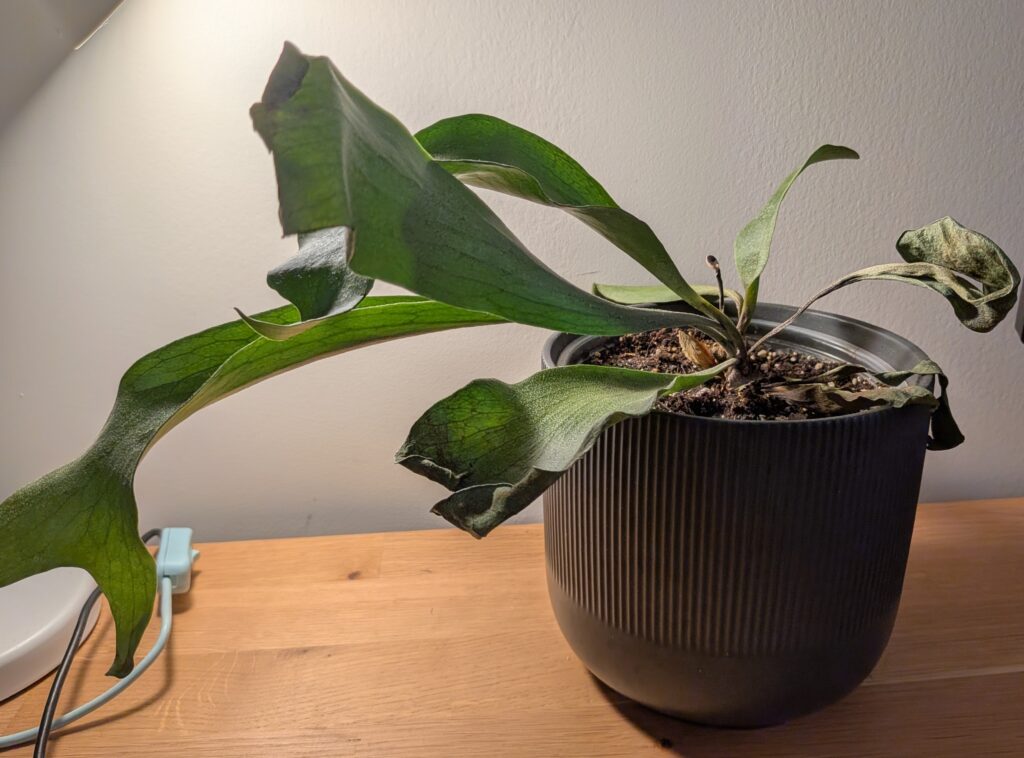
My staghorn fern was dying. I took a photo, but I didn’t just want a diagnosis — I wanted to know why and how to save it. Those two questions — what’s wrong with this plant? and how do I care for it? — seem like logical questions that would come after one another. That said, under the hood, I learnt that they’re completely different retrieval problems. At the time of my research, no single off-the-shelf model solved both.
So I built Botanify AI. Here’s how I kept the architecture cost-efficient without cutting corners on what actually matters.
The Constraint That Shaped Everything
Every architectural decision had a cost dimension.
Eventually, I landed with a cost of $43/month — two Google Cloud Run containers, one for plant identification and one for the RAG pipeline. That’s a real cost I’m absorbing to keep Botanify free for users. For the rest, I leveraged open source options.
- Embedding models: CLIP and BGE — both open-source, both state-of-the-art for their domains
- Vector database: Qdrant running in a Docker container — no subscription, no per-query fees, no vendor lock-in
- Built to scale without rebuilding — independent collections mean the architecture extends, not redesigns, as volume grows
The goal wasn’t to only use free models or tools. It was to only pay for compute that I actually needed.
Why Two Embedding Models?
When I first started exploring models via Claude Code, I tried looking for a single model for both text and images. Turns out, that model doesn’t really exist (yet).
CLIP (Contrastive Language-Image Pretraining) understands images. Pass it a photo of diseased leaves and it embeds it into a meaningful vector space. But CLIP’s text encoder was optimized for short captions, not long-form documentation. Ask it to retrieve detailed watering schedules or fertilization timelines and it underperforms.
BGE (BAAI General Embedding) is a dedicated text embedding model — excellent for natural language queries and long-form documents like plant care instructions. But it has no concept of visual input.
The decision: use both. BGE for text retrieval, CLIP for visual retrieval, both collections living in a unified 768-dimensional space in Qdrant.
How the Two Flows Work
Text RAG — /query
- User asks a natural language question (“Why are my staghorn fern tips turning brown?”)
- BGE embeds the query → searches
carecollection - Retrieved text chunks → passed to LLM
- LLM synthesizes into a grounded response
Straightforward retrieval; the LLM grounds the answer in actual documentation rather than hallucinating care advice.
Visual Diagnosis — /diagnose
This one has an extra step that makes the whole thing work.
- User uploads a photo
- CLIP embeds the image → searches
diseasecollection - Returns a metadata label:
{ disease_name: "Tomato___Early_blight", score: 0.95 } - That label becomes a text query → BGE searches
carefor treatment text - CLIP metadata + BGE care chunks → both passed to LLM
- LLM returns structured JSON: disease name, severity, treatment steps, prevention tips
Step 4 is the cross-modal bridge. CLIP doesn’t return prose — it returns a dataset category label. That label triggers a second retrieval pass from a different collection entirely. The LLM sees output from both and synthesizes a diagnosis.
The CLIP Limitation — And What’s Actually Happening
CLIP cosine similarity scores on plant disease images sit around 0.31–0.35. That sounds bad. It requires some unpacking.
Cosine similarity measures the angle between two vectors in embedding space — a score of 1.0 is a perfect match, 0.7–0.9 is strong, 0.3–0.5 is weak. So 0.31–0.35 is at the floor of useful retrieval. But a low cosine score can mean two different things.
The first is straightforward: the retrieved result is genuinely irrelevant. The second — what’s happening here — is domain gap. CLIP was trained on 400 million general image-text pairs. Plant pathology close-ups were a rounding error in that dataset. So when CLIP sees brown lesions on a soybean leaf and brown lesions on a tomato leaf, it treats them as visually similar — because to a model that has never specialized in plant disease, they are.
A low cosine score doesn’t always mean bad retrieval. Sometimes it means the embedding model doesn’t speak your domain’s language yet.
The workaround is in the prompt. The LLM is explicitly instructed to use CLIP matches for disease type identification only, and to re-anchor the diagnosis to the actual plant the user photographed. The plant_name field the user provides grounds the final response.
It’s not a perfect solution. But it’s transparent in the output, and it works well enough to be genuinely useful.
Why One Container Pays Off
Running two collections in one Qdrant instance, inside one Docker container, has some practical advantages that only became clear after building it:
Single infrastructure. One container, one deployment. Not two separate services to maintain.
Independent scaling. The disease image collection can grow — new species, new conditions, new training data — without touching the plant care collection.
Independent re-embedding. If a better text model replaces BGE tomorrow, I can re-embed the plant care collection without touching CLIP or the disease images. Swap out one, leave the other.
Cross-collection querying. The /diagnose flow queries both collections in a single request. Qdrant handles that natively. The unified 768-dimensional space is what makes it possible.
What This Enables in the App
Point your camera at a sick plant. Botanify AI identifies the likely disease, pulls treatment protocols from the care database, and returns a structured plan — what the condition is, how severe it looks, what to do about it, and how to prevent recurrence.
The same infrastructure handles plain text questions. “How often should I water a staghorn fern in winter?” goes through BGE, retrieves care documentation, and comes back as a clean response.
Two flows. One container. $43/month to keep it running for everyone.
Botanify is free — no ads, no subscription. Available on iOS and Android.